Author: Philip Godfrey
An introduction to Agent Flows
Oracle AI Data Platform Workbench introduced Agent Flows on 14th July 2026, providing a space for users to build, test and deploy custom Agent Flows.
This addition to the workbench allows customers and businesses alike to build Agent Flows to help you achieve ROI on AI, through successful building, testing and deployment of Agent Flows.
This blog aims to guide users on best practices, based on our experience in the field, to create Agent Flows that deliver value.
What is Agent Flows in AIDP Workbench?
Agent flows are end-to-end applications incorporating AI agents, tools, and access to data.
What you build depends on the business problem you are trying to solve, but some key points to be aware of around the make-up of an Agent Flow:
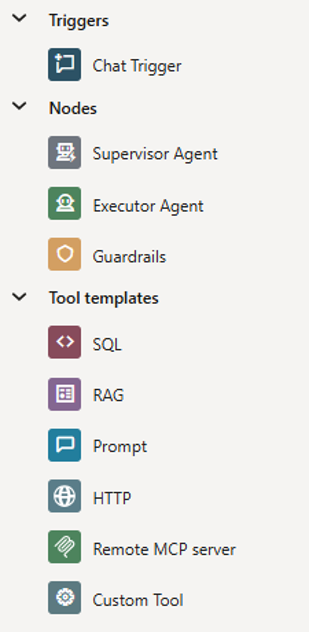
Triggers
The starting point of your Agent Flow, the chat trigger. This is the entry point where you would like the user communication to begin. These typically connect to guardrails or supervisor agents next.
Nodes
The second layer in your Agent Flow, which is made up of a Supervisor Agent, which is your orchestrator; an Executor Agent underneath, to perform your specific tasks, and Guardrails (optional) are your policy and safety layer, assisting with PII & content moderation.
Tools
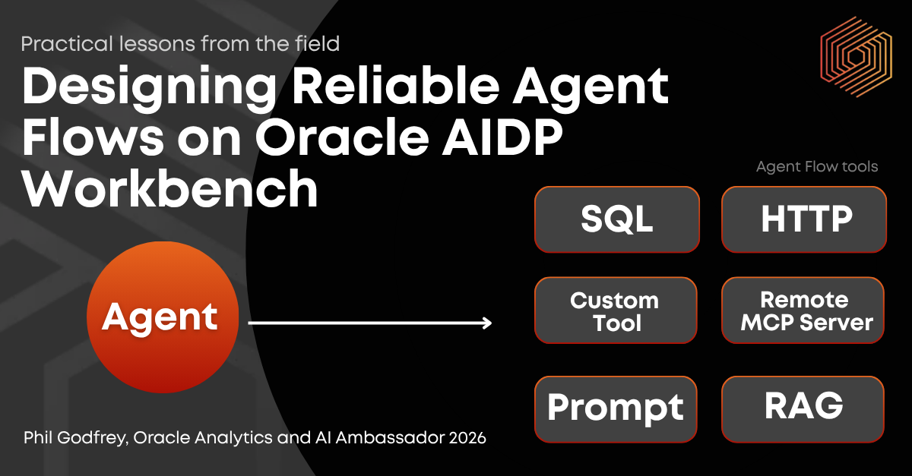
The final layer in your flow, and come in the shape of tool templates, with 6 tools available for inclusion, out of the box.
What Tools are available?
Tool templates are accessible by the Agent Flow and can be leveraged to help build flows.
SQL Tool
Provide SQL commands to interrogate data from connected database.
RAG Tool
Retrieve information from connected knowledge bases and aims to respond with relevant and context-aware information in natural language.
Prompt Tool
Uses a parameterised prompt to invoke a chosen Large Language Model, enabling text generation and transformation tasks such as summarisation, translation, drafting and code explanation.
HTTP Tool
Allows your agent to call any HTTPS REST API. You simply configure the request, and the agent invokes at runtime.
Remote MCP Server
Developers can connect agents to Remote Model Context Protocol (MCP) Servers.
Custom Tool
Provide custom Python code as a tool package for your agent to access, allowing you to extend AIDP functionality effortlessly
For more information on tooling options, you can explore here:
Practical Design Lessons for Building Reliable Agent Flows
Agent Flows are very powerful tools, but when used incorrectly can be costly, not only of tokens and money, but also valuable time.
Vertice has a long history of best practice and understanding technology and how it works, so want to provide our expertise to make sure that you can make best use of Agent Flows, as quickly as possible.
These lessons reflect patterns we’ve observed across customer engagements, combined with hands-on experience building, testing, and refining Agent Flows in the field.
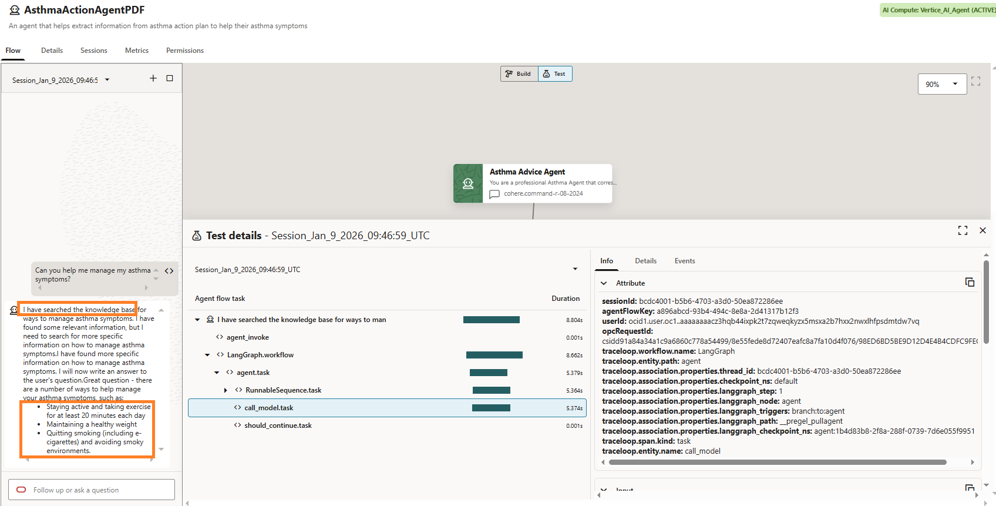
Lesson 1: Don’t Design a Single Agent Flow to Do Everything
It can be tempting to start with the most difficult and complex use case (high risk / high rewards). You need to break these down into smaller tasks (or sub-tasks) – design an agent to do one job, and do it very well.
Why is this important?
Debugging complex agent flows with multiple tools & actions included can become very complex, very quickly, and small changes can have unintended consequences downstream.
Lesson 2: Test What the Agent Flow Is Not Designed to Do
Imagine the scenario, you have built and test an Agent Flow, and it’s working well and you think it might be ready for a production deployment. The problem here is not what the agent is doing correctly, but what it’s setup not to do.
Why is this important?
To properly assess if your agent flow is ready for production, you need to design test strategies to handle the edge cases.
What happens if someone passes in an ambiguous comment?
What happens if there is data missing at the beginning of the chain or part-way through?
Build Agent Flows to handle missing data is imperative. Pilot data may always be available, but production isn’t.
Lesson 3: Builders Should Not Be the Only Testers
When the same people who build Agent Flows also test them, the flow almost always passes, why is this? Because builders understand the data, intent of the agent and the expected behaviour of how it should work and behave.
Why is this important?
Your end-users likely aren’t builders and will therefore do unexpected things that provide unexpected results. This is where many production failures often occur, so including this as part of your testing is key.
Lesson 4: Agent Flows Are Systems, Not Prompt Engineering
A common mistake is placing too much logic inside prompts or agent instructions. Agent Flows should be designed as systems, not large prompts.
Why is this important?
Agent Flows incorporates multiple tooling (Prompt / SQL / RAG tools) and must be designed with this in mind. Each tool will perform a distinct task and will do it well. Also keep in mind what is downstream.
You wouldn’t pass all your data to a prompt and ask it to summarise, so don’t do the same with Agent tooling.
Lesson 5: Build complex agents incrementally, one tool at a time
Complex agents rarely work correctly when built all at once. Adding multiple SQL tools, prompts, and branching logic before testing makes failures difficult to diagnose.
Instead, treat agent design as incremental system construction:
- Add one tool
- Test it
- Validate outputs
- Then add the next capability
Why is this important?
Agent Flows behave more like software systems than prompts, therefore building them incrementally reduces risk and improves reliability.
Operational Considerations Often Overlooked Early
While not unique to Agent Flows, the following operational practices become increasingly important as usage grows:
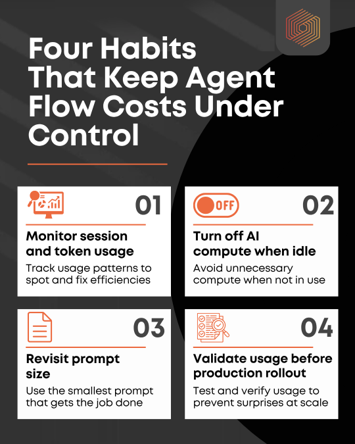
- Monitor session metrics and token usage
Agent Flows can consume tokens quickly, especially when prompts grow or multiple tools are invoked. Reviewing session metrics helps identify inefficiencies early. - Turn off AI compute when not in use
Dedicated AI compute required for Agent Flows, which can remain active longer than needed. Deactivating compute when not required prevents unnecessary spend. - Revisit prompt size regularly
Larger prompts increase latency and cost without always improving results. - Validate usage patterns before production rollout
Pilot usage rarely reflects real production load.
Interested to know more?
What about training?
Contact us today to arrange an assessment or email:

Philip Godfrey
Principal AI & Data Analytics Consultant