

Author: Philip Godfrey
These augmentations, such as Auto-Insights, Explain and AI Assistant integration, utilises Machine Learning and AI elements to provide even more options to assist with Data Storytelling.
One of my favourite features in this space is Language Narrative, which is the focus of this blog, as it’s had some recent and very useful enhancements made available in the Oracle Analytics Cloud July 2025 update.
What is Language Narrative?
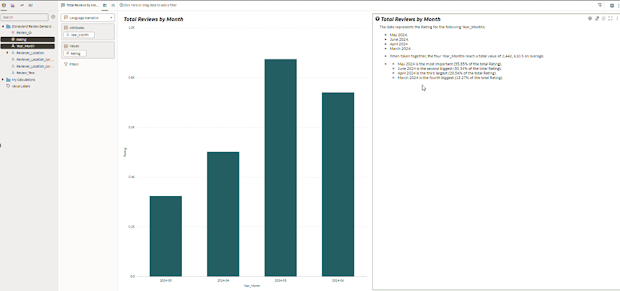
Language Narrative in a nutshell provides an AI generated summary of attributes and measures passed to it. It takes your visualisation and generates a summary on-the-fly.
Under the hood, it utilizes Natural Language Processing, a subfield of Artificial Intelligence and Machine Learning, to generate this summary based on the attributes passed to it.
From a user perspective however, like most other features in OAC, its very user friendly, with a simple drag-and-drop interface, and a lot can be achieved in a few clicks.
Using Language Narrative
You can utilise Language Narrative from the grammar pane, using this icon here:
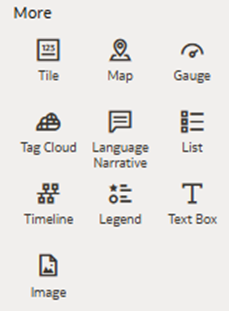
Key Components of Language Narrative
- Level of Detail: sliding scale between 1 and 7
o 1: Short summary of visualization
o 4: More detailed, but easily consumed
o 7: Lowest level of detail
- Analysis Selection: user can select between two options for analysis:
o Trend
o Breakdown
- Language Selection: user can select which language to report:
o English
o French
What’s New?
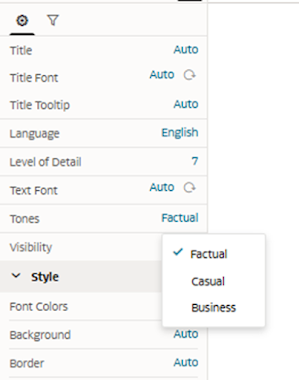
The July 2025 release of Oracle Analytics provided a key update for authors enabling improved Data Storytelling, opportunities, with the inclusion of three distinct tones:
- Factual
- Business
- Casual
These tones allow users to select the most appropriate tone, based on their audience, which is critical for impactful storytelling, ensuring the insights you have derived can be easily consumed.
Factual – clear and precise
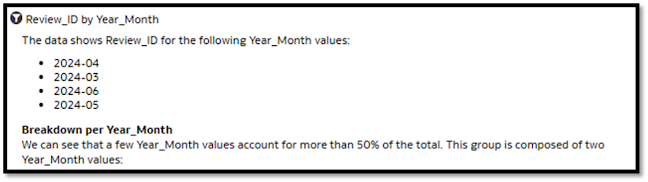
This example uses clear language, quite direct with no element of confusion: “the data shows Review_ID for the following Year_Month values”
If we focus on that first sentence of generated text, and compare it to the other tones:
Business – professional and strategic
Quite like factual, but aligned with more strategic language.
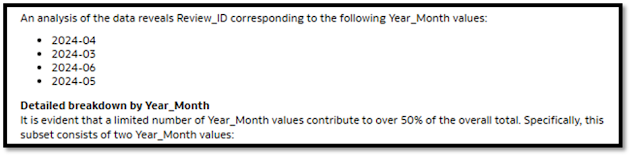
The same example as above now returns. “An analysis of the data reveals Review_ID corresponding to the following Year_Month values”
Casual – conversational and engaging
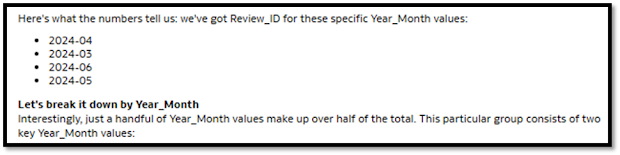
The same text as above no presents as much more easy-going, maybe like you would use if you were showing an analysis to a co-worker:
“Here’s what the numbers tell us: we’ve got Review_ID for these specific Year_Month values”
It feels very friendly, much more relaxed, and a great option depending on your audience.
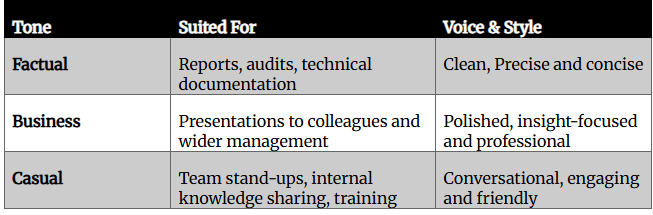
When to use each tone?
This decision comes down to you as an individual, but I’d like to share some examples of when I might use it in case it’s helpful depending on your audience.
Interested to know more?
We’d be more than happy to discuss your requirements or questions, please get in touch here.
Contact us today to arrange an assessment or email:

Philip Godfrey
Principal AI & Data Analytics Consultant